Word Templates
Word Templates
Save a template
- Download the required template, select File > Save As.
- Double-click This PC.
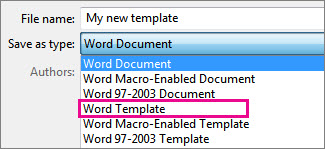
- Type a name for your template in the File name box.
- Save document as a template
- Office automatically goes to the Custom Office Templates folder.
Use the template
- File → New → Personal / Custom and pick the template
- Opening a template creates a new document based on it and the original template stays unchanged.
- Use the Styles pane instead of manual formatting when you can
- Save as a normal document
Do not save over the .dotx unless you mean to edit the template itself.